
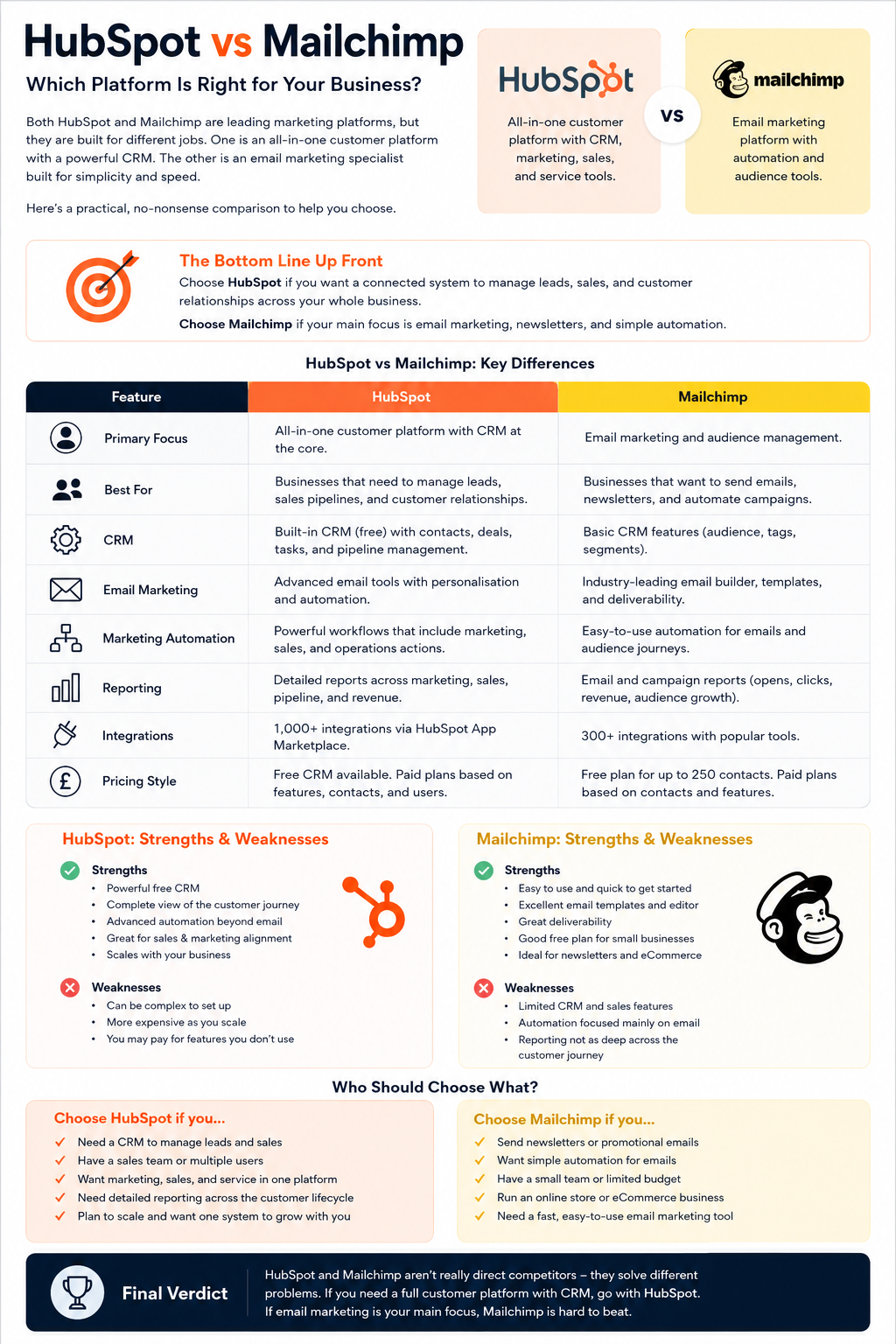
HubSpot vs Mailchimp comes down to one decision: do you mainly need email marketing, or do you need a CRM that connects marketing with sales? Mailchimp is usually the better option for newsletters, promotions and straightforward customer journeys. HubSpot is stronger when leads need owners, deal stages, follow-up tasks and revenue reporting.
For many small UK businesses, Mailchimp is the quicker and cheaper starting point. However, a growing B2B company can outgrow it if staff begin tracking enquiries and proposals in spreadsheets.
HubSpot solves that wider problem. Yet its useful advanced features sit behind a sharp price jump. Buying it for a monthly newsletter would be like hiring a sales department to post a letter.
HubSpot vs Mailchimp: the short answer
| Business need | Better choice | Reason |
|---|---|---|
| Newsletter and promotional emails | Mailchimp | Faster campaign setup and a stronger email-first workflow |
| A free sales CRM | HubSpot | Contact, company, deal and task records are included |
| Simple welcome or abandoned-basket sequence | Mailchimp | Standard customer journeys need less setup |
| Lead scoring and sales handover | HubSpot | Marketing activity can change CRM status and assign work |
| Small online shop | Mailchimp | Email and shop integrations fit short buying cycles |
| B2B lead generation | HubSpot | Better support for long buying cycles and sales pipelines |
| Revenue attribution | HubSpot | Campaign activity can connect with deals and revenue |
| Lowest-cost entry point | It depends | Contact count, users, sends and required features change the answer |
My verdict: choose Mailchimp when the work ends after the email is sent. Choose HubSpot when the email starts a sales or service process.
Prices and plan limits in this article were checked on 18 September 2026. Both companies can change offers, allowances and renewal terms. Confirm the final GBP quote and VAT position before buying.
What is the main difference between HubSpot and Mailchimp?
Mailchimp is an email-first marketing platform. It organises work around audiences, contacts, tags, segments and campaigns. That model suits a business asking: “Who should receive our next message?”
HubSpot is a CRM-led customer platform. A contact can connect to a company, deal, ticket, meeting and sales activity. HubSpot CRM is built to answer: “What has happened with this person, and what should our team do next?”
The distinction sounds small until a business receives valuable enquiries.
Imagine a UK consultancy selling a £15,000 service. A potential client reads an article, downloads a guide and books a call. Someone must qualify the enquiry, assign an owner, prepare a proposal and record the outcome.
Mailchimp can capture and nurture that person. However, the consultancy will probably need another CRM for companies, deals, tasks and forecasts.
HubSpot can keep the marketing response and sales activity on one record. That shared history is its main advantage.
The handover test: what happens after somebody clicks?
Most Mailchimp comparison pages count features. A better test is to follow one genuine enquiry from the first click to the final outcome.
Take the most valuable marketing response your business receives. It might be a request for a quote, a booked demonstration, an abandoned basket or a downloaded guide. Then ask five questions:
- Does a named employee need to take responsibility for the response?
- Must that person complete a task by a deadline?
- Does the enquiry move through defined sales stages?
- Will several people or departments need the same customer history?
- Must management connect the original marketing campaign with eventual revenue?
If the answer is “no” to most of these questions, Mailchimp may be the cleaner marketing platform. It can send the right message, record the response and support the next email without introducing a sales system the team does not need.
If the answer is “yes” to three or more, HubSpot CRM is likely to fit the operating process better. The marketing response can create work for a salesperson, change a lifecycle stage and remain connected to a deal.
This is the central decision. Mailchimp mainly automates communication. HubSpot marketing can automate communication and the work that follows it.
HubSpot vs Mailchimp for email marketing
Mailchimp is the easier email marketing product for most small teams. Its builder, templates, segmentation and reporting support newsletters and promotional sends without forcing the user to design a sales process.
A typical Mailchimp campaign follows a clear route:
- Choose an audience or segment.
- Select a template.
- Write and preview the email.
- Schedule or send it.
- Review opens, clicks and conversions.
That process works well for marketing campaigns where the response does not need to create a deal or alert a salesperson.
HubSpot marketing email tools also cover templates, personalisation, segmentation, testing and reporting. The difference appears after the click.
For example, HubSpot can support a journey where a form submission creates a contact, sends an email, updates a lifecycle stage and alerts a salesperson. The response becomes part of a managed customer record.
Choose Mailchimp for email when:
- newsletters and offers are the main job;
- one team owns the audience;
- customers usually buy without speaking to sales;
- another system already manages customer relationships;
- staff need to create campaigns quickly.
Choose HubSpot for email when:
- website, email and sales activity must share one record;
- marketing leads need owners and follow-up dates;
- lead scoring affects what happens next;
- management wants campaign influence connected to deals;
- several teams work with the same customer.
Email winner: Mailchimp for straightforward campaigns; HubSpot for email connected to a longer customer journey.
Which platform has the better CRM?
HubSpot wins clearly. Its free tools include contact and company records, deals, tasks and pipeline management.
Mailchimp describes its audience tools as a marketing CRM. These profiles, tags, segments and behavioural records help marketers send more relevant messages. They are not a direct replacement for deal pipelines, sales forecasting or service tickets.
A retailer may not need those functions. Its customer journey could consist of a product view, abandoned basket, purchase and repeat order. Mailchimp can support that cycle through shop integrations.
A B2B supplier faces a different problem. It may sell to an organisation with several decision-makers and a six-month buying process. HubSpot can connect the people, company, deal value, meetings and outstanding tasks.
The useful question is not “Does Mailchimp have a CRM?” Ask this instead:
Do we need better marketing contact management, or do we need a working sales pipeline?
If you need a flexible sales CRM but do not want the wider HubSpot suite, our Attio vs HubSpot comparison examines another option.
CRM winner: HubSpot.
Marketing automation and workflow automation
Both products automate marketing, but their limits differ.
Mailchimp concentrates on audience and campaign actions. Common uses include welcome emails, birthday messages, product follow-ups and abandoned-basket reminders.
Its Essentials plan supports automation flows with up to four steps. Standard and Premium allow up to 200 steps, based on Mailchimp’s current plan information.
HubSpot combines marketing automation with workflow automation. Depending on the plan, a workflow can update CRM properties, rotate owners, create tasks, branch on behaviour and coordinate work between marketing and sales.
As automation platforms, the two products therefore operate at different depths:
| Automation task | Mailchimp | HubSpot |
|---|---|---|
| Send a welcome sequence | Strong | Strong |
| Trigger an abandoned-basket email | Strong with a shop connection | Available with the right setup |
| Add a tag or update a segment | Strong | Strong |
| Change a lifecycle stage | Limited CRM context | Native CRM action |
| Assign a lead to a salesperson | Not its main purpose | Strong |
| Create a sales task | Requires another system | Native workflow action |
| Branch by deal information | Limited | Strong on suitable paid plans |
More automation is not always better. A three-email sequence that staff understand can outperform a complicated workflow nobody checks.
Draw the process before choosing the software. Record the trigger, decision, action, owner and exit rule. If the workflow only sends messages, Mailchimp may be enough. If it changes sales work, HubSpot is the better fit.
Our guide to marketing automation tools explains how these systems connect campaigns, data and follow-up.
Automation winner: Mailchimp for simple customer flows; HubSpot for cross-team processes.
HubSpot vs Mailchimp pricing in the UK
The cheapest headline price rarely gives a fair Mailchimp comparison. The products charge for different units and reserve major features for different plans.
HubSpot Marketing Hub pricing
HubSpot’s UK pricing displayed the following starting figures when checked. Promotional rates and contract terms can change.
| HubSpot plan | Displayed starting price | Included marketing contacts | Main cost warning |
|---|---|---|---|
| Free | £0 | Free-tool limits apply | HubSpot branding and basic automation |
| Starter | From £7 per seat/month on the displayed offer | 1,000 | Check the post-offer renewal price |
| Professional | From £702/month with annual billing | 2,000 | Required onboarding was about £2,600 |
| Enterprise | Confirm the current UK quote | 10,000 | High subscription and onboarding costs |
Professional creates the biggest jump. At £702 a month, the annual subscription is £8,424. Adding the displayed £2,600 onboarding fee produces a first-year starting cost of £11,024 before VAT, extra contacts and other services.
That calculation does not mean Professional is poor value. It means buyers should identify the exact workflow or reporting need that justifies the upgrade.
HubSpot also separates marketing contacts from other CRM records. Non-marketing contacts can remain in the database without entering the paid marketing-contact tier, subject to the current rules. Only marketing contacts can receive marketing emails or adverts, so status management affects the bill.
Mailchimp pricing
Mailchimp pricing changes with the plan and selected contact band. The UK page showed these starting figures when checked:
| Mailchimp plan | Displayed starting price | Starting contact position | Monthly send allowance |
|---|---|---|---|
| Free | £0 | Up to 250 contacts | 500 sends, capped at 250 a day |
| Essentials | From about £9.77/month | 500 contacts | Ten times the contact limit |
| Standard | From about £15.04/month | 500 contacts | Twelve times the contact limit |
| Premium | From about £263.13/month | Premium starts at a much larger contact allowance | Fifteen times the contact limit |
Mailchimp says non-US prices are estimates based on exchange rates. The exact charge can vary, and displayed prices exclude applicable taxes and fees. Use its live marketing pricing calculator for your database size.
The Free plan includes one user, one audience, up to 250 contacts and 500 monthly sends. Essentials supports flows with up to four steps. Standard and Premium support longer flows with more branching.
What will each platform cost after 12 months?
Before buying, calculate three database sizes:
- contacts today;
- expected contacts in 12 months;
- expected contacts in 36 months.
Then add seats, onboarding, send overages, integrations, migration work and staff time.
This catches two common mistakes. A business may choose HubSpot Starter and later discover that its lead-routing process needs Professional. Another may choose Mailchimp Essentials and later need Standard for deeper automation.
Price winner: Mailchimp for email-only use. HubSpot may cost less than combining several tools when CRM, sales and service functions are genuinely needed.
The three-year cost that headline pricing misses
Do not compare one Mailchimp subscription with one HubSpot subscription and assume the cheaper line item wins. The products may replace different parts of the software stack.
Use this calculation for each option:
Three-year cost = subscription + contact growth + user seats + onboarding + migration + integrations + external software + administration time
Create three forecasts: the current database, the expected database after 12 months and the expected database after 36 months. Then price the features required at each point.
For Mailchimp, include the cost of any separate CRM, sales-pipeline tool, reporting product or connector. For HubSpot, include paid Core Seats, marketing-contact increases, onboarding, implementation help and any additional Hubs.
The staff-time line should not be ignored. If an employee spends four hours every month exporting contacts, fixing duplicates or reconciling reports, multiply those 48 annual hours by the organisation’s realistic employment cost. A low subscription can still support an expensive process.
Is Mailchimp still cheaper when you need a separate CRM?
Mailchimp usually wins a direct email marketing price comparison. The position becomes less clear when a company also pays for sales software and the work required to keep both systems aligned.
| Cost or task | Mailchimp plus a separate CRM | HubSpot Marketing Hub and CRM |
|---|---|---|
| Email marketing | Mailchimp plan | Included within the selected Marketing Hub plan |
| Sales pipeline | Separate CRM subscription | Native HubSpot CRM records and pipelines |
| Data synchronisation | Connector, native integration or manual work | Shared platform, although configuration is still required |
| Duplicate management | Records may diverge between systems | Lower sync risk inside one database |
| Campaign-to-revenue reporting | Depends on the integration and field mapping | Available through the connected CRM on suitable plans |
| Implementation | Usually lighter at the start | Heavier, particularly at Professional level |
| Failure risk | Broken syncs and conflicting subscription fields | Poor setup, unused features and weak staff adoption |
This does not make HubSpot automatically cheaper. It gives buyers a fairer comparison. Mailchimp plus a well-run CRM can be an efficient setup. HubSpot can be better value when the alternative involves several subscriptions and regular manual repair work.
Reporting, analytics and attribution
Mailchimp reports on campaigns, audiences, clicks, conversions and connected shop activity. This gives an email team the information needed to compare subject lines, content and customer response.
HubSpot reports across a wider journey because its CRM holds marketing and sales information. Suitable paid plans can connect a campaign with a contact, opportunity, owner, stage and revenue value.
This matters when management asks: “Which activity created qualified pipeline?” Mailchimp can show the campaign response. HubSpot can also show what happened after the response.
However, a larger reporting system does not fix poor data. Teams still need consistent lifecycle stages, source fields and campaign names.
Reporting winner: Mailchimp for campaign reporting; HubSpot for marketing-to-revenue reporting.
Ease of use, templates, integrations, support and deliverability
These categories matter, but they should not be reduced to an artificial score.
Mailchimp is generally quicker for building standard marketing campaigns. Its email-first navigation and template selection help a small team move from an idea to a scheduled send without first configuring a wider customer system.
HubSpot has more menus and more decisions because email sits inside a much larger CRM platform. That creates a steeper learning curve, but the extra context becomes useful when personalisation depends on company, deal, owner or lifecycle information.
HubSpot also has the broader business-software ecosystem. Mailchimp integrations remain strong around online selling, content management and audience growth. Buyers should ignore headline app counts and check the exact connection they need, including which fields sync, how often they update and which paid plan is required.
Support should be checked against the plan being purchased rather than the brand as a whole. Free and entry-level users may receive different channels from Professional or Premium customers. Ask who will help with data migration, failed automations and billing changes before signing an annual agreement.
Which platform has better email deliverability?
There is no responsible permanent percentage that proves Mailchimp or HubSpot always reaches more inboxes. Published deliverability tests are snapshots affected by the test list, sending domain, message content, destination providers and methodology.
On either platform, results will depend heavily on:
- valid consent and list quality;
- spam complaints and engagement;
- sending-domain reputation;
- SPF, DKIM and DMARC configuration;
- consistent sending patterns;
- removal of invalid and chronically inactive addresses.
Both companies provide established sending infrastructure. Neither can compensate for a purchased list, poor authentication or repeated sending to people who do not respond.
Mailchimp integration with HubSpot: can you use both?
Yes. A business can use HubSpot as its CRM and keep Mailchimp for email marketing.
HubSpot offers a certified Mailchimp data-sync app. This can work when each system has a clear job and staff test the sync rules.
A sensible division could be:
- HubSpot owns companies, deals, lifecycle stages and sales owners.
- Mailchimp owns email templates and campaign sends.
- Both systems keep consent and subscription data aligned.
- A test contact checks each mapped field before the full database syncs.
The integration has limits. HubSpot states that contact data sync needs Data Hub Starter or a higher plan. Groups, tags, opens and clicks do not all move through the same data-sync route, so buyers must check which additional app or method carries campaign activity.
Using both platforms can preserve a familiar Mailchimp campaign process. It can also create duplicate records, subscription errors and unreliable reporting if ownership is unclear.
Integration verdict: use both only when the combination solves a measured problem.
Decide which system owns each field
Businesses using both products should create a one-page ownership map before switching on the integration.
| Information | Recommended owner | Reason |
|---|---|---|
| Companies, deals and sales stages | HubSpot | These records drive the sales pipeline |
| Sales owners, tasks and follow-up dates | HubSpot | They control internal responsibility |
| Mailchimp campaign layouts | Mailchimp | The email team builds and sends them there |
| Marketing consent and subscription status | One nominated master system | Conflicting values can cause unlawful or unwanted sends |
| Campaign opens and clicks | Mailchimp initially | These events originate in the sending platform |
| Revenue and closed-deal value | HubSpot | Revenue belongs with the deal record |
| Shared contact details | Agree a field-by-field direction | Two-way editing can overwrite newer information |
Test the map with ten internal or test contacts. Subscribe, unsubscribe, change an email address, update a company and close a sample deal. Confirm where every change appears before syncing the full database.
Which platform is better for different UK businesses?
Newsletter publisher or local organisation
Choose Mailchimp. It suits a publisher, venue, charity or local company that mainly sends updates and promotions to subscribers.
HubSpot would add value only if replies and form submissions need a managed sales or service process.
B2B consultancy or agency
Choose HubSpot when inbound marketing and lead generation feed a sales pipeline. A guide download, webinar registration or enquiry can create a contact and start the correct follow-up.
Mailchimp remains a good option if another CRM already tracks proposals and deals.
Small online shop
Mailchimp is often the more direct choice. It supports product emails, abandoned-basket reminders, post-purchase messages and repeat-purchase campaigns.
HubSpot becomes more useful when the shop also sells high-value products requiring consultations, quotes or account management.
Growing company with several teams
HubSpot has the advantage when marketing, sales and service need the same customer history.
However, the company must budget for setup, data ownership and training. Buying the software without agreeing how staff will use it simply moves the confusion into a more expensive system.
Which platform supports better marketing strategies?
The software should follow the strategy, not dictate it.
Mailchimp suits marketing strategies built around audience growth, regular promotions, customer retention and repeat purchases. Its strengths sit close to the email channel.
HubSpot suits a broader inbound marketing model. Content, forms, lead generation, CRM records, sales activity and reporting can operate inside one connected platform.
Neither product improves a weak offer, poor list or unclear message. It simply makes the chosen process easier to repeat and measure.
When should you switch from Mailchimp to HubSpot?
Switch when the current setup creates a measurable operating problem, not because HubSpot has more features.
Good reasons include:
- salespeople cannot see marketing history;
- contacts are copied manually between tools;
- several people follow up the same enquiry;
- proposals and opportunities sit in spreadsheets;
- the business cannot connect campaigns with pipeline;
- marketing needs CRM-based lead scoring or routing.
Weak reasons include a redesigned interface, a persuasive demonstration or the hope that software will repair a poor process.
If you decide to move, audit audiences, tags, fields, consent and unsubscribes first. Import a small test group before the full database. Rebuild only the automations that still have a clear purpose.
Do not close the Mailchimp account on launch day. Confirm which historical reports remain accessible and keep a lawful backup.
Migration risks to resolve before moving
| Risk | What can go wrong | Action before launch |
|---|---|---|
| Suppression data is omitted | Previously unsubscribed people may receive marketing | Export and preserve unsubscribes, bounces and suppression lists |
| Tags and fields are mapped badly | Segments and marketing automation stop working | Document every source field and destination property |
| Duplicate contacts are imported | Bills, ownership and reports become unreliable | Deduplicate and choose the surviving record |
| Consent evidence is lost | The business may be unable to show how permission was obtained | Retain the source, date and wording of consent |
| Historical reports disappear | Previous campaign performance can no longer be checked | Export the reports needed for comparison and audit |
| Every old workflow is rebuilt | Ineffective processes move into the new platform | Rebuild only workflows with a current purpose and owner |
| Authentication is left until launch | Email sending may be delayed or poorly configured | Prepare and verify the sending domain in advance |
Run a 30-day test before signing a long contract
A demonstration shows what a product can do. A controlled pilot shows whether your team can operate it.
Use the same small project in both platforms:
- Import 100 clean test or consenting contacts.
- Build the same newsletter and mobile preview.
- Create a five-step welcome sequence.
- Connect one real form.
- Route one qualified lead to a named salesperson.
- Record an unsubscribe and confirm where the change is stored.
- Produce a report showing the campaign response and the next commercial action.
- Note every feature that requires a higher plan.
- Record the setup time and the number of people who needed help.
Score the pilot against the work your business actually performs. Do not award points for features nobody will use.
The result may expose a useful middle ground. A company might keep Mailchimp for marketing campaigns and use HubSpot’s free CRM for sales. Another may discover that maintaining two databases costs more in staff time than moving the whole process to HubSpot.
HubSpot vs Mailchimp: final verdict
Mailchimp is the better email marketing tool for many small UK businesses. It is easier to start, cheaper for email-only use and well suited to newsletters, promotions and standard customer journeys.
HubSpot is the better customer platform. It connects email marketing with a full CRM, sales pipelines, service records and wider reporting. That makes it the stronger choice for B2B firms and organisations where several teams manage the same customer journey.
Use this final test:
- If you need to send better email, choose Mailchimp.
- If you need to manage the full lead-to-customer process, choose HubSpot.
- If you already have a good CRM, compare the cost of connecting Mailchimp with the cost of replacing both systems.
Price the decision over three years. Count the contacts, users and workflows you will genuinely need. The right platform is the one that removes real work without charging you for a large block of unused capability.
What not to base the decision on
Do not select either product solely because it has more templates, integrations or automation steps. Large numbers look persuasive in a sales presentation but say little about whether the software fits one specific business process.
Avoid these buying mistakes:
- choosing HubSpot because advanced workflow automation sounds impressive, without defining a workflow;
- choosing Mailchimp because its opening price is lower, while ignoring the cost of a separate CRM;
- treating audience management as a replacement for a sales pipeline;
- assuming a large integration catalogue guarantees the required fields will synchronise;
- comparing promotional prices without checking renewals;
- moving platforms without preserving consent and suppression data;
- expecting software to repair an unclear marketing strategy or inconsistent follow-up.
The best buying document is not a feature checklist. It is a map of the trigger, customer data, employee action, commercial outcome and report required for each important process.
Frequently asked questions
Is HubSpot better than Mailchimp?
HubSpot is better for CRM records, sales pipelines, cross-team automation and revenue reporting. Mailchimp is often better for newsletters, promotional emails and smaller marketing teams.
Is Mailchimp cheaper than HubSpot?
Mailchimp is usually cheaper for email-only use. HubSpot can offer better value when a business needs CRM, marketing, sales and service functions that would otherwise require several products.
Can Mailchimp replace HubSpot?
Mailchimp can replace HubSpot for email-led marketing and audience management. It does not directly replace HubSpot’s sales pipelines, deal records, tasks and service functions.
Can HubSpot replace Mailchimp?
Yes. HubSpot Marketing Hub can send campaigns, build forms and landing pages, segment contacts and automate follow-up. Check the marketing-contact, sending and workflow limits before moving.
Can HubSpot and Mailchimp work together?
Yes. HubSpot offers Mailchimp integration and data-sync options. Decide which platform owns each field, test subscription status and monitor duplicate records.
Which platform is better for newsletters?
Mailchimp is usually better for a newsletter-only operation. HubSpot becomes more useful when newsletter activity must feed a CRM, sales process or customer-service record.
Does Mailchimp have a CRM?
Mailchimp provides audience profiles, tags, segments and marketing behaviour. It does not offer the same company, deal, pipeline and ticket structure as HubSpot CRM.
Which platform has the better free plan?
HubSpot’s free tools offer more value for CRM work and allow 2,000 marketing email sends a month. Mailchimp’s Free plan supports up to 250 contacts and 500 monthly sends. The better option depends on whether the business needs contact management or email volume.
About the author
Gavan Corry is a journalist and editor at TheMarketingBlog. He writes about marketing software, search strategy and the commercial decisions facing UK businesses.
Sources
- HubSpot Marketing Hub pricing and plan limits
- Mailchimp marketing pricing and contact calculator
- Mailchimp explanation of its pricing plans
- HubSpot Mailchimp data-sync app
Prices, allowances and integration requirements were checked against the linked product pages on 18 September 2026. This article is an editorial comparison based on published product information and practical buying analysis. It does not claim that TheMarketingBlog ran a controlled deliverability test or used every paid feature.
Author: Gavan Corry